
Azure Kubernetes Service (AKS) removes much of the operational heavy lifting of running Kubernetes, but AKS cost optimization remains a hands-on discipline. You still decide on the number of clusters, node pools, VM size selection, and autoscaling parameters, each of which comes with a cost impact that’s easy to miss until the bill arrives.
Teams running AKS at scale routinely report 30% to 60% cost reductions after a proper optimization pass, with most of the savings coming from compute rather than control plane or networking. The gap between paying full Azure list price and running an optimized cluster is rarely a tooling problem, it is a continuity problem: manual fixes drift within weeks as workloads change.
In most enterprises, you’re dealing with multiple teams, shared clusters, and fast release cycles. Developers over‑provision “just to be safe,” clusters grow organically, and non‑production environments run 24/7. Meanwhile, costs are split up across compute, storage, and networking, making it difficult to see what’s actually driving up spend.
This article gives a concise overview of how AKS pricing works, 10 straightforward best practices you can use right away, and a look at how ScaleOps automates much of the work for you on AKS.
Key Takeaways
- AKS cost optimization requires a layered approach: pod requests drive the demand signal that node-level scaling responds to, so both layers must be tuned together to avoid waste.
Azure Reservations deliver the most predictable savings on steady-state workloads, but only when purchased after rightsizing, committing against overprovisioned baselines locks in inefficiency. - Spot node pools can cut compute costs significantly for fault-tolerant workloads, but require a fallback regular node pool and proper taints to protect critical services.
- Non-production clusters running 24/7 are one of the fastest sources of recoverable spend, scheduling start/stop or using ScaleOps Sleep policies can eliminate this waste with minimal effort.
- Continuous automation outperforms manual tuning at scale: as teams and workloads grow, periodic rightsizing reviews drift further behind actual usage patterns.
What Is AKS Cost Optimization?
AKS cost optimization is the process of aligning your AKS resource utilization with actual workload needs. Resources include clusters, nodes, pods, storage, networking, and any other add-ons.
The key is to optimize costs while preserving system dependability and operational speed. Done correctly, you’ll pay only for the cloud resources you actually use. Your systems will also maintain low latency and meet service level objectives (SLOs) during periods of high traffic volume.
AKS Control Plane Tiers
AKS pricing starts with the managed control plane, chosen per cluster:
- Free tier: Costs $0 per hour per cluster but does not guarantee system availability; best for dev/test and small non‑critical clusters
- Standard tier: Operates at $0.10 per cluster per hour while providing 99.95% system availability; the default for most production clusters
- Premium tier: $0.60/cluster/hour, with an SLA plus Long-Term Support (LTS) for up to 2 years of Kubernetes version support; ideal for regulated or long‑lived workloads
The costs of control plane operations remain minimal compared to compute expenses, yet they accumulate into substantial costs across multiple cluster environments. Choose carefully which specific clusters require the Premium tier.
What Are the Main Cost Components in AKS?
Most of your AKS bill comes from underlying Azure services:
- Compute: The largest component is usually the compute expense from Virtual Machine Scale Sets (VMSS), which operate as worker nodes. Note: The cost-effectiveness of different VM families and sizes in these sets varies significantly.
- Storage: Using the higher-performance tiers of Azure Disks (Premium or Ultra) across clusters will spike costs quickly. Ephemeral OS Disks offer a fundamental optimization, letting the OS run from the local VM cache instead of using a managed disk.
- Networking: Ingress/egress access to clusters is handled by Azure Load Balancers, which also drive expenses.
- Monitoring: Finally, the costs of Azure Monitor, Log Analytics, and third-party add-ons can pile up when your system generates extensive amounts of metrics and log data.
Optimizing AKS costs requires all these system layers to work in harmony via a synchronized approach, rather than making changes only to nodes or pods.
Why AKS Workloads Waste Resources by Default
Default pod requests are conservative. Developers set CPU and memory requests based on worst-case projections rather than observed usage. Once requests are set, Kubernetes treats them as reservations, blocking other pods from using that capacity even when the workload sits idle.
Node pools scale up faster than they scale down. Cluster Autoscaler responds quickly to pending pods but waits 10 minutes by default before evicting under-utilized nodes. In bursty workloads, this means paying for excess capacity for most of the day.
System pods and DaemonSets consume hidden capacity. Azure CNI, kube-proxy, Azure Monitor, and other system components reserve CPU and memory on every node. On smaller VM SKUs, system overhead can consume 20% to 30% of a node before any application pod runs.
Spot node pools require active management. Spot offers significant savings, but eviction handling, fallback to regular pools, and workload steering all require ongoing tuning. Most teams either avoid Spot entirely or run it manually on a fraction of workloads.
Reservations get committed against overprovisioned baselines. Buying Azure Reservations before rightsizing locks in the waste. Teams that rightsize after reserving end up paying for committed capacity they no longer need.
The 10 practices below address each of these patterns. The first six are manual tactics every team can apply. The last four are where automation becomes the difference between a one-time optimization and continuous cost discipline.
10 AKS Cost Optimization Best Practices
The diagram below shows the flow of scaling signals in AKS: Changes in traffic and pod-level settings (HPA/VPA/ScaleOps) shape scheduling pressure, which then drives node-level actions (Cluster Autoscaler and Spot pools).
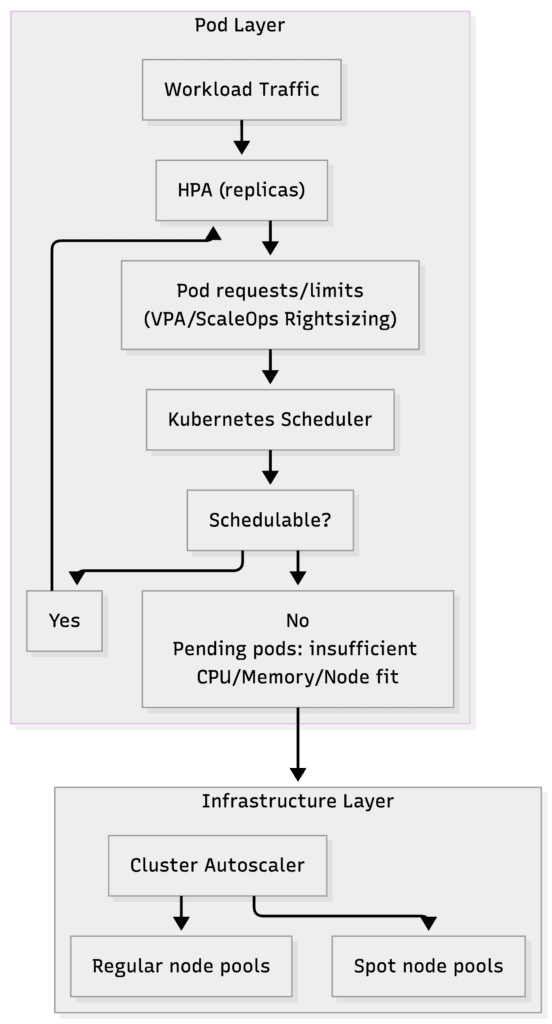
In other words, pod requests create the demand signal that infrastructure scaling responds to.
The following recommendations serve as a practical checklist to help teams lower their AKS costs without sacrificing reliability or developer velocity.
1. Get Basic Cost Visibility in Place
The process of tracking money distribution is the foundation for AKS cost optimization:
- Enable Azure Cost Management and Billing and organize data by subscription, resource group, and AKS-related resource types; this lets you quickly attribute spend, spot the biggest cost drivers, and catch cost anomalies early.
- Create a tagging system that includes environment, team, service, and cost_center labels to manage AKS clusters and their associated resources.
- Implement automated resource management platforms like ScaleOps to not just track expenses, but actively optimize them at the namespace, workload, and label levels.
2. Rightsize Pods and Nodes
Rightsizing nodes and pods enables you to avoid spending money on unused capacity while maintaining the performance of your workloads:
- Select B-series (burstable) VM SKUs for development and testing, and D-series for standard production environments.
- Use actual usage data from Azure Monitor or Prometheus to achieve optimal pod CPU/memory requests and limits.
- Leverage ScaleOps real-time automated pod rightsizing to perform continuous pod resource adjustments based on changing workload behavior.
3. Configure Kubernetes Autoscaling Correctly
Kubernetes scaling happens in more than one layer. You have the pod layer which sizes applications, and the node layer (Cluster Autoscaler), which provides the infrastructure. You must tune both to avoid waste.
Pod settings create the demand signal. Node scaling supplies the capacity needed to manage increased traffic levels while preventing your system from running at maximum capacity all the time.
To properly configure autoscaling:
- Enable Cluster Autoscaler on your node pools with suitable min/max counts.
- Define HPAs with realistic target utilization, not based on the worst-case scenarios.
- Use ScaleOps alongside HPA to coordinate vertical rightsizing with horizontal scaling.
Pro tip: Kubernetes guidance warns against running HPA and VPA on the same metric because they can create feedback loops (thrashing). ScaleOps avoids this by dynamically adjusting resource requests while keeping your HPA stable; this allows you to scale vertically and horizontally at the same time without conflict.
4. Use Spot Node Pools for Tolerant Workloads
Spot node pools let you run fault-tolerant workloads, like batch processing jobs, CI/CD agents, and stateless development environments, at a steep discount. This significantly cuts compute costs while keeping critical services safe on regular nodes:
- Create a dedicated Spot node pool for interruptible workloads using the Azure CLI:
az aks nodepool add \
--resource-group <rg> \
--cluster-name <cluster> \
--name spotpool \
--priority Spot \
--eviction-policy Delete \
--spot-max-price -1 \
--enable-cluster-autoscaler \
--min-count 1 \
--max-count 10- Target the Spot pool from your workloads with labels, node selectors, and tolerations.
- Keep critical services on regular node pools protected by PodDisruptionBudgets (PDBs), and use ScaleOps Spot Optimization to steer appropriate workloads onto Spot.
5. Use Azure Reservations for Steady Workloads
Reservations lower the cost of always‑on capacity by trading a commitment for a lower cost rate:
- Optimize before you commit. Rightsize your workloads first (ideally with an automated resource management tool like ScaleOps) to find your true baseline, then use metrics to identify the steady-state node count per VM family during a typical week.
- Purchase 1-year or 3-year Reserved Instances for the baseline capacity through the Azure portal or the CLI.
- Regularly review the reservation coverage against your actual usage.
6. Schedule Non-Production Clusters
Non‑production clusters often run 24/7 even when no one is using them, spiking compute and supporting-service costs like monitoring and logging:
- Classify AKS clusters by environment (dev, test, staging, prod) and define working-hour schedules for each non-production environment.
- Automate start/stop with scripts or pipelines using the Azure CLI.
- Integrate these scripts with a scheduler (e.g., GitHub Actions, Azure Automation, or your CI/CD system) to stop clusters from running at night and on weekends.
Utilize ScaleOps’ built-in Sleep policy to automatically scale down replicas to zero during a specific time window. For example, dev environments on weekends.
7. Clean Up Storage and Orphaned Disks
Storage waste accumulates slowly through old PVCs, snapshots, and unattached disks, quietly piling up on your Azure bill:
- Use the Azure CLI to locate and review unattached disks to determine which ones should be deleted.
- Establish procedures for environment retention and cleanup operations.
- Perform scheduled reviews of large or high-performance PVCs to move disks from the Premium to the Standard tier.
8. Optimize Networking and Egress
Poor network design often creates egress charges and adds extra load balancers:
- Co-locate AKS clusters and their primary data stores in the same Azure region, and use virtual network peering or private endpoints instead of cross-region or public internet traffic.
- Standardize on a shared ingress layer (e.g., Ingress NGINX Controller or Azure Application Gateway Ingress Controller) rather than per-service load balancers.
- Periodically review any IPs and load balancers not running an active service.
9. Enforce Guardrails with Policy and Quotas
Guardrails prevent overspending by setting defaults and limits for each team and environment:
- Apply Azure Policy definitions for AKS to restrict allowed VM SKUs, enforce mandatory tags, and control which add-ons, such as Azure Monitor, can be enabled.
- Configure Kubernetes Resource Quotas to limit CPU and memory usage per namespace:
apiVersion: v1
kind: ResourceQuota
metadata:
  name: team-a-quota
  namespace: team-aspec:
  hard:
    requests.cpu: "10"
    requests.memory: "32Gi"
    limits.cpu: "20"
limits.memory: "64Gi"- Set Limit Ranges with sensible requests and limits so new workloads start from a cost-efficient baseline rather than “unlimited” resources.
10. Make Optimization Continuous with Automation
AKS environments evolve consistently as teams roll out new services or change configurations:
- Connect all AKS clusters (prod, testing, non-prod) to ensure that policies and optimization logic are applied consistently across environments.
- Regularly review optimization reports and adjust high-level policies (e.g., rightsizing aggressiveness and Spot usage rules). Don’t waste time hand-tuning individual workloads.
Utilize ScaleOps to continuously rightsize pods, optimize replicas, and increase node utilization and performance in coordination with HPA and Cluster Autoscaler.
How Does ScaleOps Support AKS Cost Optimization?
ScaleOps is a production-ready platform that delivers real-time, autonomous, and continuous resource optimization for Kubernetes, extending beyond the basic dashboard display and generated recommendations.
| Approach | Tooling | Effort | Continuous |
| Manual rightsizing | Azure Monitor, kubectl | High | No |
| Cluster Autoscaler alone | AKS built-in | Medium | Partial |
| Spot node pools | Azure Spot VMs | Medium | No, requires tuning |
| HPA + VPA combined | Kubernetes native | Medium | Conflict-prone |
| Autonomous management | ScaleOps | Low | Yes, real-time |
The platform’s primary capabilities for AKS cost optimization include: automated pod rightsizing, replica and node optimization, spot optimization, and smart pod placement.
ScaleOps works consistently across AKS and other managed K8s platforms. ScaleOps runs self-hosted by design. ScaleOps Cloud provides centralized visibility, policy management, and governance across environments.
Next Steps for AKS Cost Optimization
AKS is great for deploying Kubernetes on Azure. But in terms of built-in cost management features, you’re on your own. Meanwhile, Kubernetes components, such as the control plane tier, node SKUs, storage, egress, load balancers, and observability add-ons, all drive operational spend.
Teams can’t rely on manual processes to manage these costs, especially as your system expands. The 10 best practices above can help you achieve AKS cost optimization, from fundamental cost tracking and resource optimization to Spot usage and reservations, scheduling, and guardrails.
But at scale? For this, companies need a platform to implement and sustain these recommendations. ScaleOps automates resource management, making the manual maintenance of complex checklists a thing of the past. Try out ScaleOps today. Automate cost optimization on AKS and achieve Kubernetes environments that are lean, reliable, and future-proof.
Frequently Asked Questions
What is AKS cost optimization?
AKS cost optimization is the process of aligning Azure Kubernetes Service resource usage with actual workload demand across compute, storage, and networking. The goal is to eliminate waste and reduce cloud spend without sacrificing reliability or performance.
How much does AKS cost?
AKS itself charges for the managed control plane: Free tier ($0/hr, no SLA), Standard tier ($0.10/cluster/hr, 99.95% SLA), and Premium tier ($0.60/cluster/hr, with LTS support). The majority of your AKS bill comes from the underlying Azure resources: Virtual Machine Scale Sets, Azure Disks, load balancers, and monitoring services like Azure Monitor and Log Analytics.
What is the best way to reduce AKS costs?
The highest-impact actions are rightsizing pod CPU and memory requests (which drive node scaling), using Spot node pools for fault-tolerant workloads, purchasing Azure Reservations after rightsizing, and scheduling non-production clusters off during idle hours. Automating these continuously with a platform like ScaleOps removes the ongoing manual overhead.
What are Azure Reservations and how do they apply to AKS?
Azure Reservations are 1-year or 3-year commitments to a minimum hourly spend on VM compute capacity in exchange for a discounted rate versus pay-as-you-go. For AKS, they apply to the underlying VM SKUs running as worker nodes. The key is to rightsize workloads first so you commit against real sustained demand, not an overprovisioned baseline.
What is the difference between HPA and VPA in AKS, and which should I use?
HPA (Horizontal Pod Autoscaler) scales the number of pod replicas based on metrics like CPU utilization. VPA (Vertical Pod Autoscaler) adjusts individual pod CPU and memory requests. Kubernetes warns against using both on the same metric because they can create feedback loops. ScaleOps resolves this by dynamically rightsizing requests while keeping HPA stable, allowing vertical and horizontal scaling to work together without conflict.
How much can I save with AKS cost optimization?
Teams running AKS at scale typically see 30% to 60% cost reductions after a full optimization pass. The biggest gains come from pod and node rightsizing (15% to 30%), Spot node pools for fault-tolerant workloads (an additional 60% to 90% on those specific workloads), Azure Reservations on the steady-state baseline (20% to 50% on reserved capacity), and shutting down non-production clusters outside business hours (30% to 70% of non-prod spend).
What is the difference between AKS and EKS for cost optimization?
AKS and EKS share the same Kubernetes-level optimization patterns: pod rightsizing, autoscaling, Spot or Spot-equivalent capacity, and reserved commitments. The differences come from cloud-specific mechanics. AKS bills the control plane per cluster ($0.10/hour Standard tier), while EKS bills $0.10/hour for every cluster regardless of tier. Spot VMs in Azure use eviction policies and max-price configuration; EKS uses Spot Instances with interruption notices. Azure Reservations cover VM SKUs across the subscription; AWS Reserved Instances and Savings Plans operate differently. Tools that manage Kubernetes resources continuously, like ScaleOps, work consistently across both.
Can I optimize AKS costs without changing my workloads?
Yes. The fastest wins come from infrastructure-level changes that do not touch workload code: enabling Cluster Autoscaler with tighter scale-down windows, moving fault-tolerant workloads to Spot node pools, scheduling non-production clusters to stop outside business hours, and purchasing Azure Reservations on the steady-state baseline. Pod rightsizing does require adjusting CPU and memory requests, but this can be automated continuously without developer intervention using platforms like ScaleOps.