Main takeaways from this article
- Kubernetes swap (KEP-2400, stable since v1.34) gives Burstable QoS pods proportional swap access via cgroup v2, while Guaranteed and BestEffort pods get zero swap.
- Two levers control pod survival: your cgroup memory limit must cover steady-state runtime, and your swap entitlement covers burst spikes above that.
- The LimitedSwap formula uses memory request, not limit:
swap_limit = (request / node_capacity) × node_swap. - Undersized swap is worse than no swap — measured 60% longer outage than a clean OOMKill.
- For vLLM workloads, model weights live in GPU VRAM (outside the cgroup). The CPU-side runtime (tokeniser, scheduler, PagedAttention swap pool) is what the cgroup limits and what the kernel swaps.
Why Kubernetes Swap Matters for GPU Inference Workloads
Kubernetes swap is the ability to configure Linux swap memory on Kubernetes nodes so that pods can use disk-backed virtual memory as overflow when physical RAM is exhausted. This feature has been a long time coming. KEP-2400 introduced swap support as alpha in v1.22 (2021) and took four years to reach GA. The critical milestone was v1.30, where the Kubernetes team removed UnlimitedSwap entirely. That mode let any container consume unlimited swap, allowing a single misbehaving pod to fill the swap device and crash the node. What survived is LimitedSwap, stable since v1.34 (August 2025). It’s cgroup v2-integrated: the kubelet sets memory.swap.max per container based on a proportional formula:
swap_limit = (memory_request / node_memory_capacity) × node_swap_size
- Guaranteed QoS pods (requests equal limits) get
memory.swap.max = 0, so complete swap isolation. - BestEffort pods also get zero swap, because with no memory request the formula’s numerator is zero.
- Only Burstable QoS pods (where requests are lower than limits) get proportional swap access.
I verified this formula byte-exact on GKE: a 128MiB request on a 16GB-capacity node with 4GB swap yielded memory.swap.max of exactly 34,365,440 bytes, page-rounded to 4KiB boundaries.
If you’re running AI inference workloads on Kubernetes — vLLM, Triton, TGI, or any model serving framework on GPU nodes — you’ve probably been told to disable swap. The kubelet won’t even start if swap is detected, unless you set failSwapOn: false in the kubelet configuration and enable the memorySwap settings.
But if you’ve also dealt with OOMKilled pods during traffic spikes on expensive GPU nodes, you know the other side. A single A100 node on GKE costs roughly $2,700 per month. When your inference pod gets OOMKilled during a burst and takes 60-120 seconds to reload model weights into VRAM, you’re losing both compute and revenue. This is the gap that tools like ScaleOps address: autonomous resource management that sets your memory requests and limits based on observed workload behaviour rather than developer guesswork. But even with optimal sizing, you still need a safety net for unpredictable spikes. That’s where Kubernetes swap comes in.
I spent two months testing Kubernetes swap on real GPU hardware: 30+ test iterations across two clusters (GKE 1.34 and kubeadm v1.29 with an NVIDIA L4), running vLLM with Mistral-7B, phi-2, and Whisper under various swap configurations.
I presented the results at KubeCon EU 2026 in Amsterdam. This article is the extended version, deeper on the Linux memory internals, more precise on the sizing, and corrected with data I discovered during final validation.
What you’ll learn:
- The three-tier memory hierarchy most discussions about Kubernetes swap completely miss (GPU VRAM → CPU RAM → NVMe swap)
- How Linux actually manages memory under cgroup pressure — anonymous vs file-backed pages, demand paging, and the kernel reclaim sequence before OOMKill
- Why two pods with identical swap entitlements had completely different outcomes, and the critical correction I discovered during validation
- Measured results from four swap configurations on identical hardware, including why two pods with identical swap entitlement had opposite outcomes
- A practical sizing guide for vLLM memory requests and limits with LimitedSwap
- A decision framework for when to enable Kubernetes swap, when to keep it off, and when misconfigured swap is worse than no swap at all
The 8x Degradation That Started This Investigation
The investigation started with a straightforward question: what actually happens to AI inference latency when Kubernetes swap is active on a GPU node? The answer turned out to be more nuanced than most discussions suggest, and the measured data was striking enough to warrant a full test campaign
I ran Microsoft’s phi-2 (a 2.7B parameter model) on CPU-only inference with constrained pod memory and UnlimitedSwap enabled on a kubeadm v1.29 cluster. The baseline p50 latency was 14.2 seconds per request — phi-2 on CPU is inherently slow, but that’s the point. Under swap pressure with memory.swap.max uncapped, that p50 jumped to 116.5 seconds. An 8.19x degradation. The kernel had swapped 1.6GB of the process’s anonymous memory to the NVMe swap device, 94,000 page-ins and 437,000 page-outs over the test window. Every inference step was blocked on disk I/O for pages that should have been in RAM.
Second test: GPU node, Mistral-7B on an NVIDIA L4. I constrained the pod’s CPU memory below what vLLM needs for its runtime overhead. The model weights live in GPU VRAM (outside the cgroup entirely), but vLLM’s CPU-side runtime — the tokeniser, scheduler, output buffers, and the PagedAttention KV cache eviction pool (--swap-space) — all live in CPU RAM, inside the cgroup. The kernel swapped 1.6GB. GPU utilisation dropped from 94% to 73.5%. Latency rose 26%. The GPU was computing, but it was constantly waiting on the CPU to fault pages back from the swap device before it could process the next batch. Prometheus showed 195,000 page-ins during the test window.
Now here’s the contrast. Same pod spec, same traffic, Kubernetes swap disabled: the pod OOMKilled immediately with CrashLoopBackOff. It was a total outage with zero requests served.
The question isn’t “should you enable Kubernetes swap.” It’s “which failure mode do you prefer?” Degraded service at 73.5% GPU utilisation, or a dead pod at 0%? And more importantly: can you configure LimitedSwap so it catches memory spikes without the 8x performance collapse?
That’s what LimitedSwap — stable since Kubernetes 1.34 — is designed to solve. But to configure it correctly, you need to understand the full memory hierarchy that AI inference workloads create on a GPU node.
The Two Types of Swap Nobody Talks About
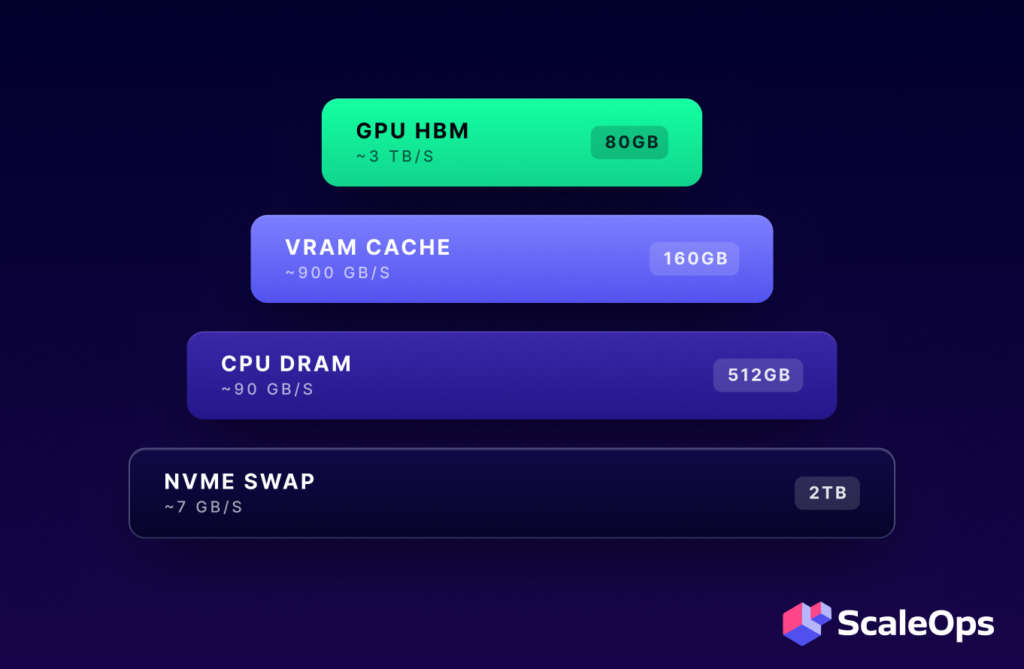
Most discussions about Kubernetes swap focus on the node-level configuration — should swap be on or off? That framing misses a critical architectural distinction for AI inference workloads. On a GPU node running vLLM, memory doesn’t live in a single pool. There are three tiers, and two of them involve swapping — managed by entirely different systems with entirely different levels of intelligence about what to evict.
Think of it like a CPU cache hierarchy: L1, L2, L3. Each level is larger, slower, and managed differently.
L1: GPU VRAM (HBM — 2 TB/s bandwidth)
This is where model weights and the active KV cache live during inference. For Mistral-7B in FP16, that’s roughly 14GB of weights permanently resident in VRAM, plus the dynamically-growing attention context (keys and values) for every active request. The KV cache is the stored attention context — one entry per token per layer per active conversation. More concurrent users means longer conversations, more KV cache entries, and more VRAM consumed.
VRAM is managed by vLLM’s PagedAttention system and the PyTorch CUDA allocator. Critically, VRAM is outside the Kubernetes cgroup, which means the memory.max cgroup limit does not apply to GPU memory, only to CPU RAM.
L2: vLLM CPU Memory Pool (RAM — 100 GB/s bandwidth)
When VRAM fills up, PagedAttention doesn’t crash the process. It evicts the least-recently-used KV cache blocks from GPU VRAM to CPU RAM via PCIe at 64 GB/s. This CPU-side buffer is what the --swap-space parameter controls:
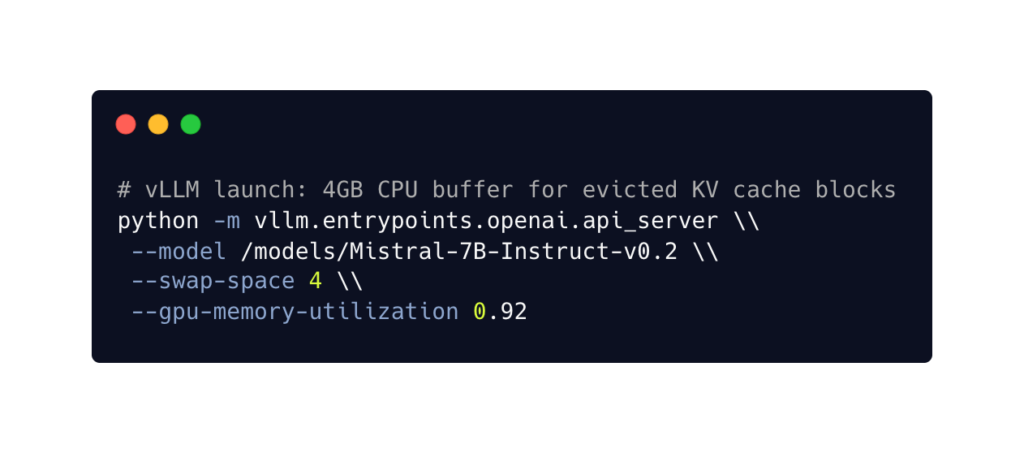
The --swap-space 4 means “allocate 4GB of CPU RAM as a landing zone for evicted attention context.” This is application-level swap: vLLM understands which KV blocks are hot and which are cold. It makes intelligent eviction decisions based on request activity. When those cold blocks are needed again (e.g., a user sends a follow-up message), vLLM copies them back from CPU RAM to VRAM.
This CPU memory pool lives inside the cgroup. It counts toward your pod’s memory.max limit.
L3: Kubernetes Swap (NVMe — 3-5 GB/s / HDD — 0.1-0.2 GB/s)
When total CPU RAM usage — vLLM’s runtime overhead plus the L2 KV cache pool plus everything else the process allocates — exceeds the cgroup memory limit, the Linux kernel starts evicting pages from CPU RAM to the swap device. This is Kubernetes swap. It’s configured at the node level through the kubelet’s memorySwap.swapBehavior setting and enforced per-container through memory.swap.max in the cgroup.
Unlike vLLM’s PagedAttention, the kernel has no understanding of what it’s swapping. It uses LRU (Least Recently Used) heuristics on anonymous memory pages. It doesn’t know whether it’s evicting a critical attention buffer that the GPU needs in 50 milliseconds, or a cold scheduler data structure that won’t be touched for another minute. That’s why L3 swap introduces latency unpredictably.
The full chain:
| Layer | What | Bandwidth | Managed by | Intelligence |
| L1 | KV cache in GPU VRAM | 2 TB/s (HBM) | vLLM PagedAttention | Knows which blocks are hot/cold |
| L2 | KV cache evicted to CPU RAM | 64 GB/s (PCIe) | vLLM PagedAttention | Application-level, intelligent |
| L3 | Anonymous memory evicted to disk | 3-5 GB/s (NVMe) | Linux kernel | LRU heuristics, blind to workload |
The design principle: always prefer higher-level swap. When VRAM fills, you want PagedAttention handling the overflow, because it understands transformer workloads. Kubernetes swap is what happens when L2 is also exhausted, it’s the kernel-level emergency catch. Application-level memory management handles the common case, and Kubernetes swap handles the failure case. You need both layers.
The performance degradation I measured in the Mistral-7B test (GPU utilisation dropping to 73.5% with 195,000 page-ins over the test window) is what happens when L3 activates on the inference hot path. The GPU wasn’t slow because of a model problem or a scheduling issue. It was waiting on the kernel to fault anonymous pages back from NVMe. That’s the cost of blind, kernel-level swap on a latency-sensitive workload.
How Linux Actually Manages Memory Under Pressure
Understanding why Kubernetes swap behaves the way it does on GPU nodes requires looking one level deeper — at how the Linux kernel categorises, loads, and reclaims memory. This is the context most Kubernetes swap tutorials skip, and it’s the reason that two pods with identical swap entitlements can have completely different outcomes.
Anonymous vs File-Backed Memory
The kernel divides all memory pages into two categories, and the distinction determines what happens when the cgroup hits its limit.
File-backed pages are memory loaded from a file on disk — shared libraries like libpython3.so, the CUDA runtime (libcudart.so), or model weight files loaded via mmap(). Each page tracks which file it came from and at what byte offset. The key property: the kernel can evict these pages by simply dropping them from RAM. The original data is still on disk in the file. If the process needs that data again, the kernel re-reads that specific 4KB page from the file. No swap device involved. No write I/O. This makes file-backed eviction essentially free.
Anonymous pages are everything the process allocates at runtime that has no file backing. For a vLLM process, this includes the Python interpreter’s heap, PyTorch tensor allocations, the tokeniser vocabulary tables, the request scheduler state, KV cache blocks that have been evicted from VRAM into the CPU swap pool, and output token assembly buffers. When the kernel needs to evict anonymous pages, the only place to put them is the swap device — because there is no original file to write them back to. This requires disk I/O, and it’s what shows up in the pswpin/pswpout counters in /proc/vmstat.
This distinction is why model weight storage format matters for memory pressure behaviour. The .safetensors format (now the default for HuggingFace models) is specifically designed for mmap(): it has a small JSON header describing each tensor’s name, dtype, shape, and byte offset, followed by the raw tensor data at those known offsets. PyTorch can map the file into virtual memory and access weight data directly without copying it into the heap. Those weight pages are file-backed — cheap to evict.
Compare that to the older pickle-based .bin format, which requires a full read() of the file followed by deserialisation into Python objects. The deserialised weights end up in anonymous memory (heap-allocated PyTorch tensors). Those are expensive to evict — they have to go to swap.
For GPU inference, this distinction is largely academic because the weights are copied to VRAM during model loading and the CPU-side copies can be released. But for CPU-only inference (like the phi-2 test that produced the 8.19x degradation), the storage format directly affects how much anonymous memory the process carries — and therefore how much swap pressure the kernel faces.
Demand Paging: How the Kernel Loads Files
The kernel doesn’t load entire files into RAM. When a process calls mmap() on a model file, the kernel creates a Virtual Memory Area (VMA) — a mapping from a range of virtual addresses to byte offsets in the file. No data is loaded at this point.
When the process first accesses a specific virtual address in that range, the CPU’s memory management unit (MMU) finds no physical page mapped and triggers a page fault. The kernel handles the fault by calculating which 4KB chunk of the file corresponds to that virtual address — simple arithmetic based on the VMA’s start address and file offset — then reads that single page from disk into a free RAM page and updates the page table.
This is called demand paging: pages load only when the application actually touches them. A 14GB model file doesn’t require 14GB of free RAM to mmap() — the kernel loads individual 4KB pages as needed, and can evict cold pages back to the file at any time.
The same mechanism applies to shared libraries. When libpython3.so is loaded, the dynamic linker reads the ELF header (which describes where each section of the binary lives within the file), then creates separate mmap() regions for the executable code, read-only data, and writable data sections. Individual 4KB pages of code are loaded on first execution, not upfront.
The Kernel Reclaim Sequence
When a container’s memory usage approaches its cgroup limit (memory.max), the kernel doesn’t immediately kill the process. It enters a reclaim sequence — a prioritised set of attempts to free memory before resorting to the OOM killer.
The sequence, in order:
- Drop clean file-backed pages — free. These pages are identical to their on-disk source. The kernel simply removes them from RAM. No I/O required. If the process needs them again, the kernel re-reads from the file (a page fault, but no swap I/O).
- Write back dirty file-backed pages — cheap. These are file-backed pages that have been modified in RAM (for example, a log file being appended to). The kernel writes them back to their source file, then drops them. Sequential I/O, relatively fast.
- Swap anonymous pages to the swap device — expensive. The kernel picks anonymous pages using LRU heuristics, writes them to the swap partition or swapfile on NVMe (or HDD), and frees the RAM. When the process needs those pages again, the kernel reads them back from the swap device (a page fault with disk I/O).
- OOM kill — last resort. Only after all reclaim options are exhausted and the kernel still cannot free enough memory to satisfy the allocation does the OOM killer terminate the process.
This means the effective memory ceiling for a container is not just memory.max. It’s:
effective_ceiling = memory.max + memory.swap.maxThe cgroup limit is a reclaim trigger, not a kill line. The kernel will use every available byte of swap entitlement before giving up.
This is exactly what the test data showed in one of the constrained-memory tests I’ll detail in the next section. The pod had a 512Mi cgroup limit and ~196MB of swap entitlement. vLLM’s runtime needed approximately 1GB. The kernel recorded 145,000 page-outs — it was actively writing anonymous pages to the swap device, trying to keep the process alive. But 196MB of swap couldn’t cover the ~500MB deficit between what vLLM needed and what the cgroup allowed. After exhausting all reclaim options, the OOM killer fired.
The kernel didn’t fail silently, it fought for the pod but didn’t have enough swap budget to win.
Four Configurations, Same Hardware: What the Data Actually Shows
I ran four swap configurations on identical hardware to isolate exactly what determines whether a pod survives memory pressure on a GPU node. The setup:
- kubeadm v1.29 on a GCE instance with an NVIDIA L4 (24GB VRAM), 64GB RAM, 48GB NVMe swapfile, running Mistral-7B-Instruct via vLLM.
- The memory request was 256Mi across all four scenarios
- The only variables were the swap mode and the cgroup memory limit.
| Scenario | Swap Mode | Limit | memory.swap.max | Outcome | GPU | Errors |
| A | NoSwap | 512Mi | 0 | OOMKilled | 0% | 100% |
| B | UnlimitedSwap | 512Mi | unlimited | Degraded alive | 73.5% | 0% (P3) |
| C | LimitedSwap | 512Mi | ~196MB | OOMKilled | 0% | 100% |
| D | LimitedSwap | 2Gi | ~196MB | Pod survived | stable | 0% |
Scenario A is the baseline most Kubernetes operators experience today: swap disabled, pod exceeds its memory limit, and OOM killer fires immediately. This leads to CrashLoopBackOff with 100% request failure, and the GPU stays idle. This is the default failure mode for any GPU inference pod under memory pressure.
Scenario B is the mode Kubernetes removed in v1.30. UnlimitedSwap lets the kernel swap without any per-container ceiling. The pod survived — zero errors during sustained load — but at significant cost. GPU utilisation dropped from 94% to 73.5% as the GPU waited for swapped-in pages on every inference batch. The kernel recorded 1.6GB of swap usage with 195,000 page-ins and 168,000 page-outs. This is why UnlimitedSwap was removed: it preserves liveness but creates unpredictable, unbounded performance degradation, and a single pod can exhaust the node’s entire swap device.
Scenario C is where the interesting finding starts. LimitedSwap with a 512Mi cgroup limit. The swap entitlement from the formula — (256Mi / 64GB) × 48GB — works out to approximately 196MB. vLLM’s CPU-side runtime needs roughly 1GB. The cgroup allows 512Mi. That’s a ~500MB deficit, so the kernel tried to compensate. I measured 145,000 page-outs, meaning it actively wrote anonymous pages to the swap device. But 196MB of swap headroom against a 500MB deficit isn’t enough. The OOM killer fired after exhausting all reclaim options.
Scenario D used the same LimitedSwap mode and the same 256Mi request, which means the same ~196MB swap entitlement as Scenario C. The only change was the cgroup memory limit: 2Gi instead of 512Mi. The pod survived with zero errors and zero restarts. The 2Gi limit gave vLLM enough room to fit its ~1GB runtime overhead without exceeding the cgroup at all. Swap was available as a safety net but wasn’t needed at steady-state traffic.
Two Levers, Not One
This correction reveals the actual model for sizing Kubernetes swap on GPU nodes. There are two independent levers:
Lever 1: Cgroup memory limit. This must cover your workload’s steady-state runtime — everything the process needs to run under normal traffic. For vLLM, that’s the Python runtime, PyTorch CPU-side state, tokeniser, scheduler, and the --swap-space KV cache buffer. If your limit is too small (Scenario C), the kernel will try to swap, but if the deficit exceeds the swap entitlement, OOMKill follows anyway.
Lever 2: Swap entitlement. This covers burst spikes above the limit — the traffic surges that temporarily push memory usage beyond your cgroup ceiling. The entitlement is determined by your memory.request via the formula, so getting your request right matters. This is where tools like ScaleOps provide direct value: by observing actual workload memory consumption over time, they can set requests that generate a swap entitlement matched to your real burst profile — rather than a number someone guessed during a sprint planning meeting.
If Scenario D didn’t need swap at steady state, why configure it at all? Because D was running under normal traffic conditions. In a separate test campaign on GKE, I tested the burst scenario: traffic ramped to 3x, pushing memory above a correctly-sized cgroup limit. With correctly-sized swap, the pod survived every overflow level. Without swap, OOMKilled on every run. With mis-sized swap (only 33MB of entitlement against a large burst), the pod OOMKilled and took 60% longer to fail than the no-swap baseline — the kernel spent time writing to swap before ultimately running out of budget and killing the process anyway.
Undersized swap is worse than no swap. It adds I/O overhead to the failure path without preventing the failure.
When Kubernetes Swap Destroys Performance
Not every workload benefits from the swap safety net. Two categories where enabling swap is the wrong choice:
Latency-sensitive inference. I tested Whisper (speech recognition) under constrained memory with swap active. The kernel swapped 503MB of process memory with 82,000 page-ins during the test window. For any workload with a sub-100ms SLA, that swap I/O is an uncontrolled variable in the latency path — every page fault adds milliseconds that break real-time contracts. The safe configuration: set requests equal to limits to get Guaranteed QoS, which sets memory.swap.max = 0 regardless of the node’s swap configuration.
Training workloads with checkpoint saves. A LoRA fine-tuning run under constrained memory showed 1.4GB of swap with 372,000 page-outs. The wall-clock overhead was only 1.01x — NVMe absorbed the swap I/O at this scale. But that was a short training job on a small model. At production scale with multi-hour runs and periodic checkpoint saves, every checkpoint serialises the full model state, triggering a burst of swap I/O that compounds with model size and training duration. The recommendation: NVMe swap may be acceptable for training, but benchmark on your actual workload before committing to it in production.
How to Size Memory for vLLM with Kubernetes Swap
The test data establishes the principles. This section translates them into a practical sizing approach for vLLM deployments running with LimitedSwap.
What Lives in CPU RAM
On a GPU node, the model weights live in VRAM — outside the cgroup. Everything else vLLM needs lives in CPU RAM, inside the cgroup. The components and their approximate footprints:
- Python runtime + PyTorch + vLLM framework code: 300–500MB
- Tokeniser vocabulary and encoding tables: 50–100MB
- Request scheduler, batch manager, routing state: 50–100MB
- vLLM CPU swap pool (
-swap-space): whatever you configure (default 4GB) — this is the L2 landing zone for evicted KV cache blocks - Output token assembly buffers: scales with concurrent requests
For a typical vLLM deployment with the default --swap-space 4, steady-state CPU memory consumption is approximately 5–6GB. This is the number your cgroup limit must cover.
The Sizing Formula
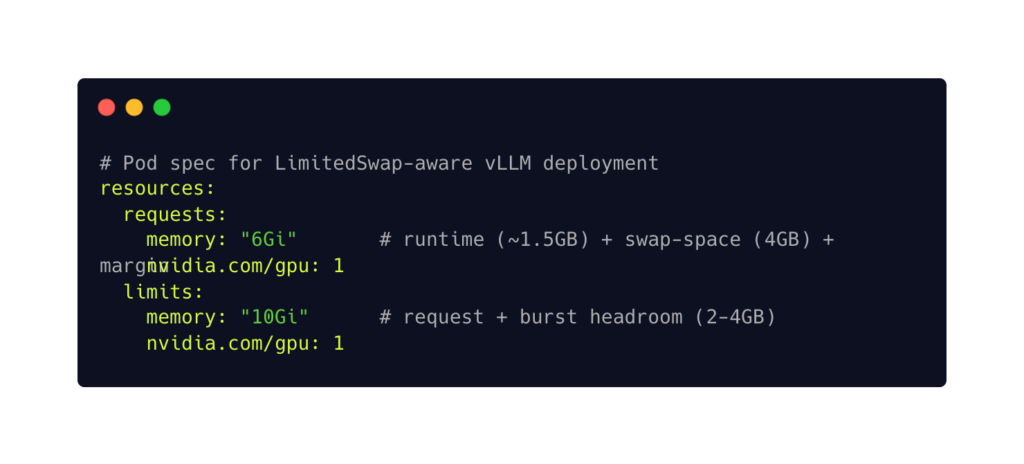
Setting request lower than limit gives the pod Burstable QoS — the only class that receives proportional swap under LimitedSwap. The swap entitlement that results from this configuration depends on your node:
swap_entitlement = (6Gi / node_capacity) × node_swap

# Example: 64GB node with 16GB swap
swap_entitlement = (6 / 64) × 16 = 1.5GB
That 1.5GB of swap entitlement covers burst spikes that push memory above the 10Gi cgroup limit:
- KV cache overflow during traffic surges
- Temporary allocation spikes during batch processing
- Concurrent model loading in multi-model setups.
Swap Device Sizing
The node-level swap device affects all Burstable pods proportionally. A practical starting point: 25% of node RAM on local NVMe. For a 64GB node, that’s 16GB of swap. For the 48GB we used in testing (75% of RAM), that’s generous but appropriate for a dedicated GPU inference node where swap headroom matters more than on a general-purpose worker.
Local NVMe only. Not HDD (1000x slower), not network-attached storage (latency variance). The performance difference between NVMe and HDD for swap is the difference between a useful safety net and an unusable one.
Monitoring Kubernetes Swap
Three Prometheus metrics to watch once swap is enabled:
container_memory_swap — per-container swap usage in bytes. Alert if any container exceeds 50% of its memory.swap.max for more than 5 minutes. Brief spikes are the expected use case. Sustained swap usage means you have a resource planning problem, not a burst.
node_memory_SwapFree — remaining swap capacity on the node. Alert below 20%. At that point, the next pod that spikes will OOMKill anyway because the swap device is nearly exhausted.
container_swap_io_count — swap I/O operations per second. This is the thrashing detector. In the Mistral-7B test, I measured 195,000 page-ins in a single test window. High sustained swap I/O means pages are being constantly faulted in and out — alert on sustained rates above your NVMe’s rated IOPS.
The Decision Framework
Not every workload should enable Kubernetes swap. The decision depends on your latency tolerance and memory access pattern:
| Workload | K8s Swap? | QoS Class | Rationale |
| Multi-model serving (KServe) | LimitedSwap | Burstable | Brief concurrent spikes overflow safely |
| Burst traffic, SLA > 200ms | LimitedSwap | Burstable | Safety net for KV cache spikes |
| Real-time inference, SLA < 100ms | NoSwap | Guaranteed | Swap I/O breaks real-time contracts |
| Training (checkpoint saves) | LimitedSwap (NVMe only) | Burstable | Benchmark at your scale first |
| Databases, etcd, control plane | NoSwap | Guaranteed | Data integrity, non-negotiable |
The pattern: if your workload can tolerate brief latency spikes during memory pressure, LimitedSwap is a cost-effective safety net that prevents OOMKills. If your workload has strict latency contracts, set requests equal to limits for Guaranteed QoS — memory.swap.max becomes zero regardless of node configuration, and the pod is fully isolated from swap.
Automating the Two Levers
The sizing approach above works when you know your workload’s memory profile. In practice, that profile changes — new model versions, shifting traffic patterns, evolving batch sizes. Getting the request wrong means your swap entitlement is wrong. Getting the limit wrong means your cgroup headroom is wrong. Either misconfiguration leads to the outcomes I measured: OOMKills, degraded performance, or swap overhead on the failure path.
This is where ScaleOps fits into the swap equation. ScaleOps observes actual workload memory consumption over time and continuously adjusts both requests and limits based on measured behaviour. For the two-lever model: it sets requests to generate a swap entitlement that matches your real burst profile, and sets limits to provide cgroup headroom that covers your actual steady-state runtime — not a number someone estimated during initial deployment.
The principle holds regardless of tooling: size your cgroup limit for what you can measure. Size your swap entitlement for what you can’t predict. Whether you do that manually with Prometheus dashboards or automatically with a rightsizing platform, the two levers need to be calibrated to your workload.
Conclusion: From Manual Sizing to Continuous Optimization
Kubernetes swap for AI workloads is no longer a question of “should we enable it?” The data from 30+ test iterations across two clusters answers that definitively: it depends on the workload. The more useful question — and the one this article set out to answer — is “where, how much, and for which workloads?”
The core model is two levers. Your cgroup memory limit must cover your workload’s steady-state runtime needs — the Python runtime, the tokeniser, the scheduler, and the vLLM CPU swap pool. Your swap entitlement, determined by the LimitedSwap formula based on your memory request, covers the burst spikes you can’t predict. Misconfigure the first lever and the pod dies regardless of swap (Scenario C). Ignore the second lever and a traffic spike takes down your inference service at the worst possible moment.
The sizing guide in this article gives you concrete numbers to start with. But workload memory profiles are not static — model versions change, traffic patterns shift, batch sizes evolve. What was a correctly-sized request last month may be an undersized request after a model update. This is where manual sizing hits its limits and continuous, observation-based resource management becomes essential. ScaleOps automates both levers: it observes actual memory consumption over time and continuously adjusts requests (which determine your swap entitlement) and limits (which determine your cgroup headroom) based on measured workload behaviour. That’s the production path from the principles in this article to a system that adapts as your workloads change.
See Your Swap Sizing Opportunities
The two-lever model in this article — cgroup limits for steady-state, swap entitlement for burst — depends on knowing your workload’s actual memory profile. Guessing those numbers is how you end up in Scenario C.
ScaleOps installs in minutes and starts in read-only mode — no changes to your cluster, no risk. It analyses your GPU workloads’ real memory consumption and shows you exactly where your requests and limits are misconfigured: pods that would benefit from swap headroom, pods that need tighter Guaranteed QoS isolation, and the cost savings from rightsizing nodes you’re currently overprovisioning for memory safety margins.
Try ScaleOps free → See your optimization opportunities before changing a single pod spec.
Book a demo → Walk through your cluster’s memory profile with our team and see how the two-lever model applies to your GPU workloads.
Frequently Asked Questions
What is the Kubernetes LimitedSwap formula?
The kubelet sets memory.swap.max per container using the formula: swap_limit = (container_memory_request / node_total_memory) × total_pods_swap_available. The numerator is the container’s memory request — not the limit. I verified this byte-exact on GKE: a 128MiB request on a 16GB-capacity node with 4GB swap produced memory.swap.max of exactly 34,365,440 bytes, page-rounded to 4KiB boundaries.
Does Kubernetes swap work with GPU workloads?
Yes, but the interaction is specific. GPU VRAM is outside the Kubernetes cgroup — memory.max and memory.swap.max only apply to CPU RAM. For inference workloads running vLLM, the model weights live in VRAM while the CPU-side runtime (tokeniser, scheduler, KV cache eviction pool, output buffers) lives inside the cgroup. Kubernetes swap catches overflow of that CPU-side memory, not GPU memory.
What is the difference between vLLM -swap-space and Kubernetes swap?
They operate at different tiers. vLLM’s --swap-space allocates CPU RAM as a landing zone for KV cache blocks evicted from GPU VRAM — this is application-level swap (L2) with intelligent eviction based on request activity. Kubernetes swap is kernel-level swap (L3) that pages anonymous memory from CPU RAM to the NVMe swap device using LRU heuristics, with no awareness of what the application considers important. vLLM’s swap-space buffer itself lives inside the cgroup, so if it plus the runtime overhead exceeds the cgroup limit, Kubernetes swap catches the overflow.
How do I prevent OOMKill on GPU inference pods?
Two levers: first, set your cgroup memory limit high enough to cover your workload’s steady-state CPU memory needs (runtime overhead plus vLLM’s --swap-space pool). Second, ensure your memory request generates a swap entitlement — via the LimitedSwap formula — large enough to absorb burst traffic spikes above that limit. If the first lever is wrong (limit too small), swap cannot compensate. If the second lever is missing (no swap configured), traffic spikes trigger OOMKill.
Is Kubernetes swap bad for performance?
It depends on the workload. For latency-sensitive inference with sub-100ms SLAs (speech recognition, real-time translation), swap I/O introduces unpredictable page fault latency that breaks real-time contracts — use Guaranteed QoS (requests = limits) to disable swap for those pods. For workloads that tolerate brief latency spikes (chatbots, batch inference, content generation with SLAs above 200ms), LimitedSwap provides a cost-effective safety net that prevents OOMKills during traffic surges.
Should I use NVMe or HDD for the Kubernetes swap device?
NVMe only. The access latency difference is approximately 1000x: NVMe provides 3–5 GB/s throughput with 3–5 microsecond access times, while HDD provides 0.1–0.2 GB/s with 10–15 millisecond access times. On HDD, every page fault during swap reclaim blocks the process for milliseconds — long enough to cascade into request timeouts on an inference workload. NVMe swap introduces measurable but bounded latency; HDD swap introduces catastrophic latency.